Dibs
Dibs, a location-based live-service game that gamifies engagement with brands. Formerly known as “Snatch” (AR Treasure Hunt). Released on Android and iOS.
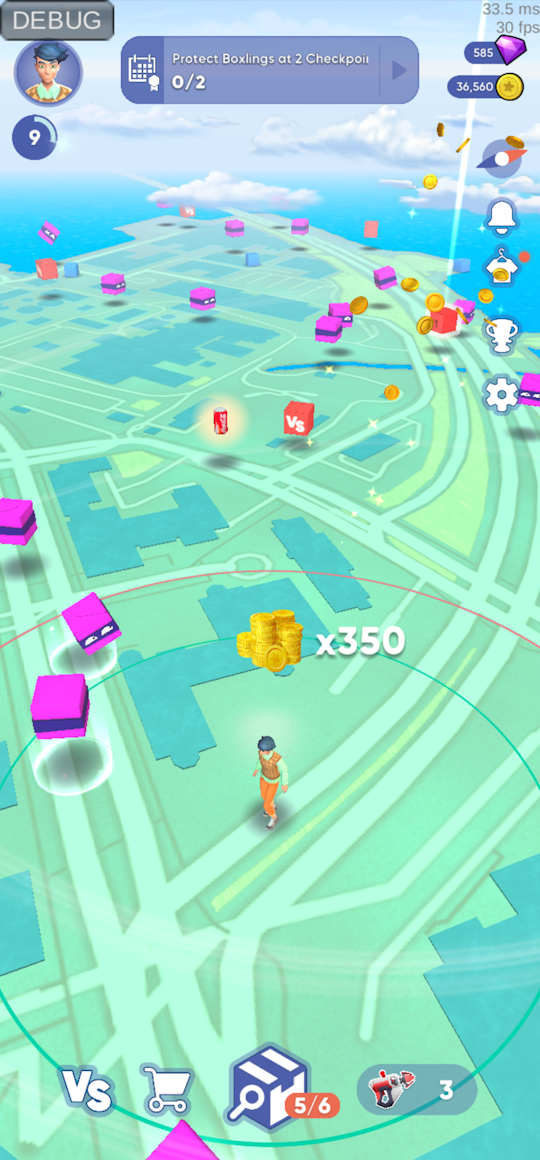
- Company: Playstack
- Tech: Unity, C#, Python, MongoDB, AWS, GitLab
What I worked on
Collaboration
- Worked in a team of 14 people using agile software development practises and git as version control software
- Collaborated with designers, artists, programmers and QA
- Authored a “getting started” guide for developers, development process guidelines and coding conventions document
- Created technical design documents for various features
- Was praised for clear and comprehensive Confluence documents and Jira tickets
- Did code reviews and mentored a junior to improve code quality and avoid bugs
- Worked as the technical “consultant” in the team. Helped to solve issues and gave guidance about the project, Unity, C# and other tech
Features
- Player character movement on a floating origin tile based world map (Mapbox SDK) based on GPS location
- Player character customizer. Clothes/wearables are defined using prefabs and scriptable objects and can be delivered via assetbundles
- Social login using Firebase Auth, Sign in with Google, Apple and Facebook
- Snatching. Players can steal boxes form other players via a minigame. Semi-realtime where players can use items and its effects will affect the other player
- Gifting. Players can gift items to friends or invite new players by sharing links. Implemented UI and client side logic. Designed the backend API and database model together with a backend developer. Had a feature flag
- Seasonal events. Customize map colors, props, UI colors, etc. Config and assets can be delivered via assetbundles
- Text localization. Texts defined in a csv file that can be also be hotfixed without a new build
- UI stack system that supports loading canvases via additively loaded scenes when needed
- Loading of png and jpg images from the web. Optimized loading, rescaling to optimize for the size on screen, pooling of textures and automatically loading and unloading when a surface or UI element becomes visible
Networking
- Client side code and GraphQL queries for our backend API
- HTTP request pipeline system in client with middleware methods to easily add logging, retrying, etc.
- Wrapper interface for the backend API to easily swap the implementation to a mockup version in client for testing offline locally
Backend
- Implemented a GraphQL server in python using Tornado and Graphene
- Worked on implementing JWT authentication
- Performed queries for maintenance in MongoDB web dashboard and using MongoDB Shell (mongosh)
- Created Bash and JavaScript scripts for importing csv files and syncing some MongoDB collections between dev, staging and prod environment
- Configured various 3rd party services integrated into the game like Firebase, Google OAuth, OneSignal
Tools
- Runtime debug menu to view logs and adjust game settings on device. Used extensively by QA and to share logs
- Improved iteration time by making the game playable without domain reload by fixing static initializations
- Quick scene selector in Unity’s toolbar to improve the workflow in a project built with multiple additively loaded scenes
- Quick server (dev, stage, prod) and user (Firebase auth) selector in Unity’s toolbar
- Game view object picker for debugging (Included in my UnityEditorExtensions package)
- Runtime logcat viewer using Java code to stream the logcat to a file and browse them e.g after a crash
- Asset reference search tool. Displays reference counts in the project window. Used multiple times to verify if some asset is safe to remove
- Created data sheets using Google Sheets and Apps Script for managing the localized texts and player character customization options
Tech
- Refactored legacy code to make code more understandable and maintainable
- Event system to make different game systems less coupled and an easy way to globally listen for events and state changes particularly in UI code
- A way to easily reference assets to be loaded from assetbundles (simpler compared to Unity’s addressables) by serializing the guid in editor and converting it to assetbundle name and assetpath at build time. Also allows to create a weak reference in editor to avoid loading the referenced asset to memory before it’s needed
CI/CD
- Built a GitLab CI/CD pipeline to run tests, build and upload assetbundles and the app for Android and iOS from self hosted Mac Mini and Windows machines
- Bash script to install project Unity versions and other build and deployment tools automatically
- Bash script to cache the Unity Library folder separately per each Unity version. Moving the folder instead of the slow zip and unzip that GitLab CI’s own cache does
- Installed build tools like Xcode, Firebase CLI, AWS CLI
- Solved various hard to diagnose errors after updating various SDKs or the build tools like Unity and Xcode
- Python script to filter the log output of the Unity build process
- Python script to generate release notes for each build from the git history
Publishing
- Set up signing certificates and provisioning profiles for publishing to App Store
- Made changes to app and updated build tools to comply with Google Play and App Store requirements
- Helped configure store pages and app information to pass reviews by Google and Apple
SDK integrations
- These integrations included adding to the Unity project and configuring in the web dashboard of each service
- Firebase Auth, Crashlytics and Analytics
- Google sign in plugin
- Implemented Sign in with Apple using Objective-C code to expose the API to Unity. Did not find a ready made solution at the time
- Push notifications using OneSignal
- Deeplinking using Branch.io
Analytics
- Implemented a wrapper for analytics events API to easily switch the underlying service
- Designed the analytics events sent by the client based on requirements
- Wrote some SQL queries for checking the analytics data
Optimization
- Optimized code and assets to improve performance and battery life
- Fixed methods using too much CPU or GC allocations per frame with help of the Unity profiler
- Reduced overdraw and draw calls with help of the frame debugger
- Reduced memory usage and app size by finding unused assets and optimizing sprite sizes and atlases with help of Unity’s build report and a custom project scanning tool to find where assets are used
- Optimized UI components like UIParticleSystem to reduce UI canvas rebuilds and layout updates